France VPS · Gravelines · KVM NVMe · DDoS protection

France VPS Hosting | KVM NVMe VPS in France

France VPS hosting: KVM VPS in Gravelines, close to your European users. NVMe SSD, a gigabit port, unmetered traffic (Fair Use) and always-on DDoS protection for EU-facing websites, SaaS, game and VPN projects. 24/7 support. Prices from $15/mo.

1 Gbit/sGigabit port
NVMeSSD storage
AutomaticSetup
KVM VDSNVMe SSDUnmetered trafficFull Root

Full Root Access

Full control and customization on your KVM VDS.

NVMe Performance

Low latency for web and database workloads with NVMe SSD.

KVM Isolation

An isolated virtual server architecture with resources reserved for you.

Automatic Setup

Automatic setup after payment and 24/7 technical support.

VDS Plans

Plans

France VDS Plans

Pick the France VDS plan that fits your workload. Every plan includes KVM virtualization, NVMe storage, full root / administrator access and network-level DDoS protection. Operating system, backup and add-ons are chosen at checkout.

Optional · Selected at Checkout

VDS Backup Service

A full image of your server is taken monthly, weekly or daily and kept on separate storage. Pricing depends on your plan’s disk size; the amounts below are added to the plan price.

PlanMonthly1 full image a monthWeekly1 full image a weekDailyfull image every day
FR-S60 GB NVMe$5/mo$7.50/mo$10/mo
FR-M120 GB NVMe$10/mo$15/mo$20/mo
FR-L240 GB NVMe$15/mo$20/mo$25/mo
FR-XL480 GB NVMe$20/mo$25/mo$30/mo

Backup is not included in the plan price; pick a single tier under “Backup Service” during checkout. Restores are carried out by our technical team on request.

Why France VPS

Why Choose France VPS?

For workloads that need an EU IP and lower latency to European visitors.

France / EU Location

Gravelines in northern France — a shorter path to EU users and peers.

KVM Virtualization

Hardware-assisted isolation — CPU, RAM and disk are yours, not shared with neighbors.

NVMe SSD

High-IOPS storage built for app and database response times.

1 Gbit/s Network

Gigabit port with Fair Use unmetered transfer — no hard traffic ceiling under normal use.

Anti-DDoS

Always-on filtering at the network layer — no add-on license, no volume/duration cap.

Plan Upgrade

Grow from FR-S to XL; move up from the customer panel when resources run short.

Use Cases

Projects You Can Run on France VPS

Practical scenarios for EU traffic and EU IP requirements.

EU-Facing Websites

Corporate sites and content platforms closer to European visitors.

SaaS & API Services

REST/gRPC APIs, workers and microservice backends.

Docker / Kubernetes / CI-CD

Compose stacks, light Kubernetes nodes, CI agents and staging.

Game Servers

Lower-latency game hosts for EU player bases.

E-Commerce

Storefronts and payment services targeting the EU market.

VPN & EU Egress

VPN, proxy and network services that need an EU egress IP.

Stack

Supported Technologies

You stay in control — common stacks you can install over SSH or from the panel.

  • Docker
  • Nginx
  • Node.js
  • Python
  • PHP
  • Laravel
  • MySQL
  • PostgreSQL
  • Redis
  • WordPress

Location

France VPS Location

Servers sit in northern France, close to the European backbone.

FR · Gravelines EU-W EU-E PEER Gravelines France · EU backbone 1 Gbit/s KVM NVMe DDoS FR · VPS Root / SSH
Location
Gravelines, France
Network
Gigabit port · Fair Use unmetered
Virtualization
KVM (hardware-assisted)
Storage
NVMe-backed SSD
Protection
Included · always on
IP
Dedicated IPv4
Scale
Plan upgrade from the panel
Management
Client Area · VNC console

Specs

France VPS Technical Specs

Verified reference summary from the live product line — a pre-order checklist.

LocationGravelines, France
VirtualizationKVM
CPU / RAM / Storage2–8 vCPU · 4–32 GB RAM · 60–480 GB NVMe by plan
Network / TrafficGigabit uplink · Fair Use unmetered traffic
DDoS ProtectionIncluded · automatic mitigation · no add-on license
Control PanelClient Area
ConsoleVNC / KVM console
Operating SystemsLinux (Ubuntu, Debian, AlmaLinux) · Windows Server
Admin accessSSH (Linux) / RDP (Windows)
Plan UpgradeSupported (FR-S → M → L → XL)
rDNSManageable via customer panel
ActivationAutomatic provisioning after payment

Compare

France VPS or Turkey VPS?

Pick by audience and latency. Virtualization and disk tech follow the same line in both locations.

Turkey VPS

  • AudienceUsers in Turkey
  • LocationIstanbul
  • LatencyLow domestic ping
  • Use caseTR web, local APIs, domestic apps
  • IPTurkey IP geography

Mostly Turkish traffic? Choose Turkey VPS. Need EU reach or an EU IP? Choose France VPS. Germany option: Germany VPS.

Order

How to Order France VPS

Launch your France-location virtual server in four steps.

Pick a plan

Choose FR-S / M / L / XL capacity.

Select an OS

Pick a Linux distro or Windows Server at checkout.

Complete payment

Provisioning starts automatically after payment.

Upgrade later

Scale up with plan upgrade from the customer panel when you need more resources.

Client panel screenshots · click to enlarge
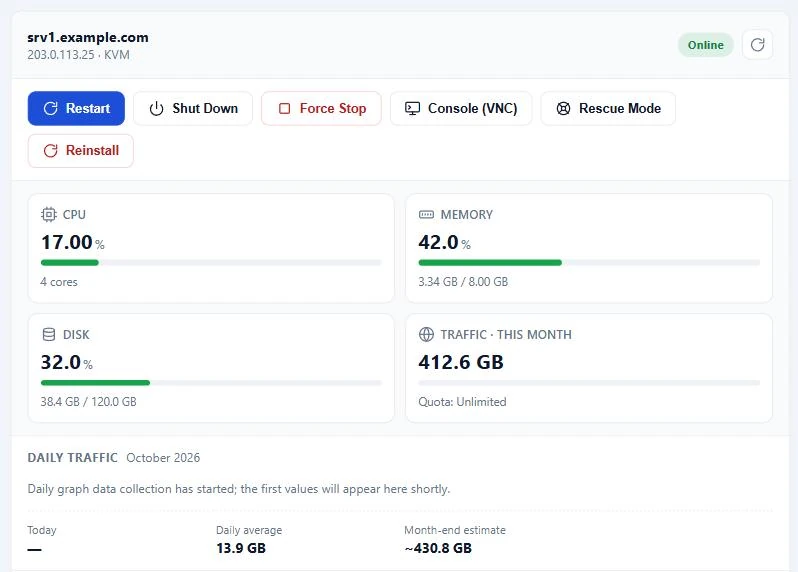
France VDS client panel: Overview and live resource usage
Overview and live resource usage
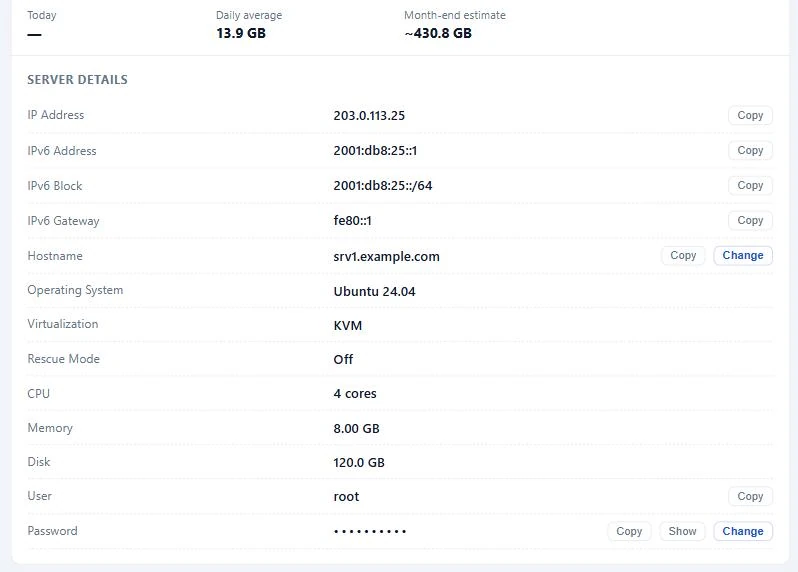
France VDS client panel: Server details, IPv6 and one-click copy
Server details, IPv6 and one-click copy
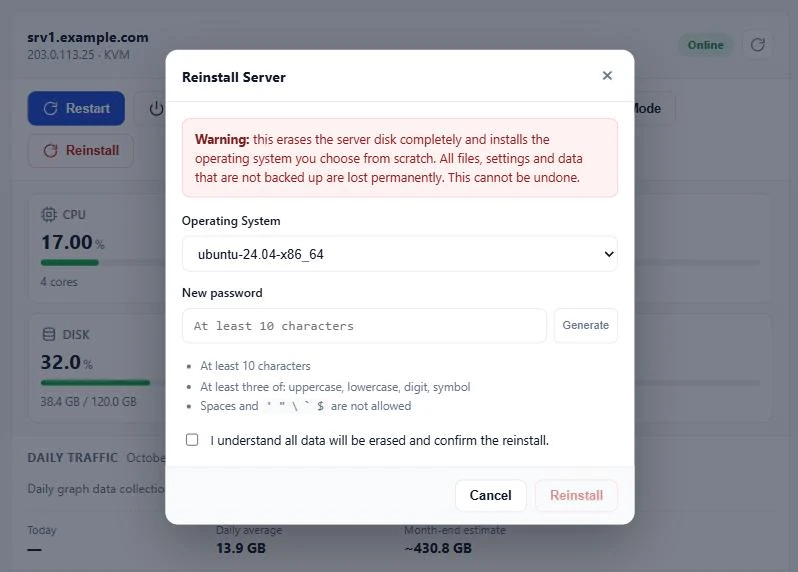
France VDS client panel: Operating system reinstall
Operating system reinstall
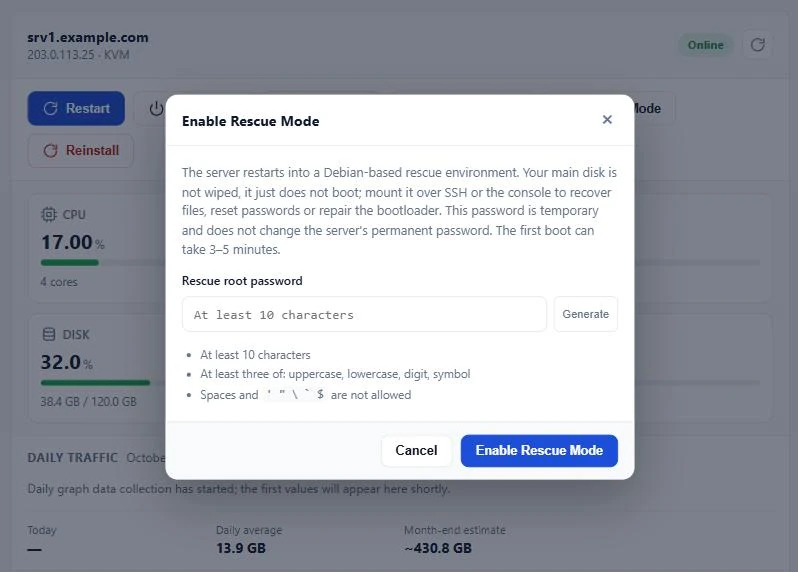
France VDS client panel: Rescue mode
Rescue mode
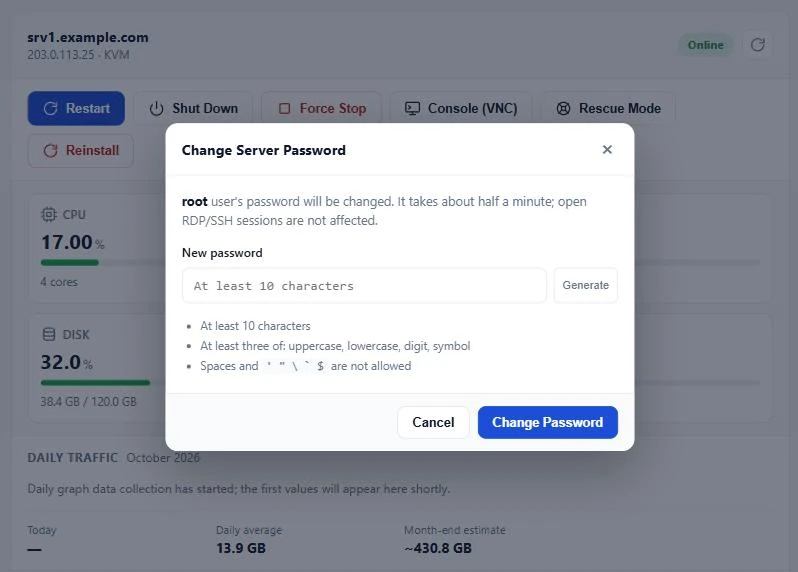
France VDS client panel: Root / Administrator password change
Root / Administrator password change

Server Management

Full Control of Your France VDS from the Client Panel

Manage your France VDS 24/7 from the client panel: console, reinstall, rescue mode, rDNS and IPv6 — handle every core task yourself, without opening a ticket.

Power Management

Start, stop and reboot your server from the panel, or force it off when it stops responding.

HTML5 VNC Console

Reach the server screen straight from your browser, even when networking is broken or SSH/RDP is down.

OS Reinstall

Pick an Ubuntu, Debian, AlmaLinux, Rocky Linux or Windows Server template and rebuild the server in minutes.

Rescue Mode

Boot into a Debian-based rescue environment without wiping your disk. Ideal for file recovery, fsck and password resets.

rDNS (PTR) Management

Set reverse DNS records for your IPv4 and IPv6 addresses from the panel and improve email deliverability.

IPv6 Support

Every VDS gets a /64 IPv6 block; the IPv6 address, gateway and block details are ready in the panel.

Root / Administrator Password

Reset a forgotten root or Administrator password from the panel without opening a ticket.

Hostname

Change your server hostname from the panel; the fully qualified (FQDN) format is completed automatically.

Live Resource Usage

Watch CPU, RAM and disk usage in real time and spot capacity needs early.

Performance Graphs

Review CPU, memory and network history in graphs and find your busiest hours.

Monthly Traffic

See this month's total traffic and your fair-use status in a single bar.

Server Details

IP addresses, OS, virtualization and resources on one screen, each copyable in one click.

lazy-placeholder.svg
Standard Infrastructure

Powerful Features Included in Every Plan

Every France-location VDS plan is delivered with KVM isolation, an enterprise-grade network and a full management panel.

Enterprise NVMe Storage
Datacenter-class NVMe, not consumer SSDs. High IOPS, low latency.
Details: France VDS plans use enterprise / datacenter NVMe drive models — not consumer SSDs. Built for endurance and high IOPS. The difference versus SATA SSD is clear on databases and cache workloads.
1 Gbit/s Port · Unlimited
A fair-use model on a 1 Gbps port; no surprise per-GB charges for typical web traffic.
Details: A 1 Gbps port and unlimited traffic are included in the plan price. Traffic is unlimited under fair use, with no per-GB charges.
DDoS Protection
Network-level DDoS protection is included; volumetric attacks are filtered.
Details: Standard network-level DDoS filtering is active, protecting against volumetric attacks such as SYN floods.
99.8% Uptime SLA
Uninterrupted service with redundant power and network in a European data center.
Details: A 99.8% uptime commitment backed by redundant UPS, generators and multiple uplinks. Reliable infrastructure for critical workloads.
Full Root Access
Full control of your KVM VDS; SSH, RDP and custom software installs.
Details: Full administrator/root access on Linux and Windows VDS plans. Install Docker, control panels and custom services freely.
KVM Isolation
Every VDS is its own KVM virtual machine; vCPU, RAM and disk are allocated to you.
Details: KVM virtualization keeps every server fully isolated; you manage the kernel, firewall and software. Not a VPS — a Virtual Dedicated Server (VDS).
Dedicated IP, IPv6 & rDNS
A dedicated IPv4 and a /64 IPv6 block for every VDS; rDNS from the panel, extra IPv4s at checkout.
Details: In addition to a dedicated IPv4 address, a /64 IPv6 block is assigned; IPv4 and IPv6 rDNS (PTR) records are managed from the client panel. Extra IPv4 addresses for multi-service setups can be selected at checkout.
Free SSL Support
HTTPS with Let's Encrypt; better SEO and secure data transfer.
Details: Let's Encrypt SSL installation is supported for your web projects. HTTPS is recommended as standard for e-commerce and corporate sites.
lazy-placeholder.svg
24/7 Support

Expert Technical Support

For VDS setup, panel configuration and network issues, our expert team is with you via live chat, tickets and phone.

Details: Technical support for operating system installation, DNS, firewall and panel issues. Critical access problems are handled with a priority response process.
Fast Response
Priority ticket handling for critical VDS access issues.
Details: We aim for a fast first response on server access and network outage tickets.
VDS Expert Team
Linux, Windows and control panel setup support.
Details: Step-by-step guidance for Ubuntu, Debian, AlmaLinux and Windows Server installations.
Tickets & Live Chat
24/7 tickets from the client area; instant answers via live chat.
Details: Open a ticket from the panel; live chat and file attachments are supported.
Setup Guides
Documentation for WordPress, Docker, game server and control panel setup.
Details: Setup guides for popular applications and game servers are provided.
hosting-4.png
icon-18.png
icon-13.png
icon-20.png
icon-23.png
icon-24.png

Operating Systems

OS selection

Which operating system should I pick?

Click a card for the full decision guide: fit, pros/cons and resource tips. Your chosen OS is installed at checkout.

Licenses

Selectable Applications

cPanel, LiteSpeed, CloudLinux and other licenses are chosen at checkout. Hover a logo for the install guide.

cPanel
Control panel
What it does: Manage sites, mail, DNS and WordPress from WHM/cPanel.
Order: Choose under Web control panel. Linux OS required.
Plesk
Linux + Windows
What it does: Panel on Linux and Windows; WordPress Toolkit, mail, DNS.
Order: Choose under Web control panel. Linux OS required.
DirectAdmin
Lightweight panel
What it does: Low-RAM panel for hosting accounts and domains.
Order: Choose under Web control panel. Linux OS required.
LiteSpeed
Web server
What it does: LSWS + LSCache instead of Apache; speeds up WordPress.
Order: Performance (LiteSpeed). Needs cPanel, Plesk or DirectAdmin.
CloudLinux
Account isolation
What it does: LVE limits stop noisy neighbors; CageFS included.
Order: Server OS (CloudLinux) group. Panel recommended.
KernelCare
Live patching
What it does: Patch the Linux kernel without a reboot.
Order: Server OS (CloudLinux) group.
Imunify360
WAF / malware
What it does: WAF, malware cleanup, Proactive Defense and firewall.
Order: Security group. Panel required.
cPGuard
cPanel security
What it does: cPanel malware scan, signatures and auto-clean.
Order: Security group. cPanel only.
CXS
Exploit scanner
What it does: ConfigServer exploit/malware scanner with upload checks.
Order: Security group. cPanel only.
OSM
Spam monitor
What it does: Stops compromised accounts from sending outbound spam.
Order: Security group. cPanel only.
JetBackup
Account backup
What it does: Panel-level file, database and mail backups to S3/B2.
Order: Backup licenses. Panel required.
Backuply
App backup
What it does: WordPress/app backups; narrower than JetBackup.
Order: Backup licenses. Panel required.
Softaculous
1-click apps
What it does: Install WordPress, Joomla and other scripts in one click.
Order: Application licenses. Panel required.
SitePad
Site builder
What it does: Drag-and-drop builder inside the cPanel account.
Order: Application licenses. cPanel only.
Webuzo
Single-user panel
What it does: Single-user panel with Softaculous Premium included.
Order: Choose under Web control panel. Linux OS required.
WP Squared
WordPress panel
What it does: cPanel’s WordPress-native panel for 10 sites.
Order: Choose under Web control panel. Linux OS required.
WHMSonic
Radio / streaming
What it does: Icecast/Shoutcast radio, autoDJ and listener stats in cPanel.
Order: Media licenses. cPanel only.
centos-simge.svg
debian-simge.svg
fedora-simge.svg
ubuntu-simge.svg
alma-linux.svg
opensuse.svg
windows-simge.svg

Frequently Asked Questions

Quick answers on location, access, protection and upgrades.

A managed virtual server hosted in France. Fast storage, gigabit networking and network protection ship with every plan.

Gravelines, France — for EU users and EU IP egress.

Yes. Root over SSH on Linux; full admin via RDP on Windows Server.

Ubuntu, Debian, AlmaLinux and Windows Server. Reinstall anytime from the panel.

Yes, on every plan. No extra fee; attacks are filtered automatically.

Yes. Move up FR-S → M → L → XL from the customer panel.

Yes. Install Docker/Compose on root KVM; FR-M (8 GB) is better for multi-service stacks.

Yes. France suits EU players; FR-M and above are common starting points.

EU-facing web, APIs/SaaS, Docker/CI, games, e-commerce and EU-egress network services.

Same technical line. Difference is city: France (Gravelines) vs Germany — pick by audience.

Set PTR records for your IPv4 and IPv6 addresses yourself in the rDNS section of the client panel. If you run your own mail server, the record should match the hostname.

Yes. Every France VDS gets a /64 IPv6 block; the IPv6 address, gateway and block details are shown in the client panel.

Use the HTML5 VNC console in the client panel to reach the server screen from your browser. If the OS will not boot, rescue mode starts a temporary Debian-based environment so you can access the disk and fix the problem.

Yes. Choose a Linux or Windows Server template in the reinstall section of the client panel and rebuild the server in minutes; this erases the disk.

Yes. Select the optional Backup Service at checkout to keep monthly, weekly or daily full-image backups on separate storage.

+902243340242